Welcome!

By registering with us, you'll be able to discuss, share and private message with other members of our community.

SignUp Now!

Bug Timing Out

Status
Not open for further replies.

nora

meatloaf
Gamemaster
Joined
Mar 28, 2023
Messages
366
Self explanatory. It's been reported that trying to join the server, no matter what you do, is met with a "[user] timed out" after several minutes of connecting.

This only happens on Willard. Every other server or singleplayer/multiplayer lobby is fine. I don't have too many addons installed outside of the Willard collection, all of which are just basic maps.
 
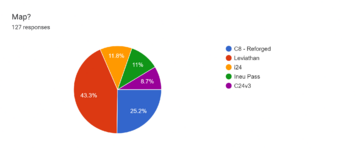
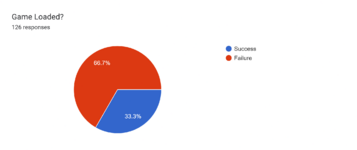
yeah i'll put my piece here. ive collected some data using google forums over the past few months i've been playing. here's some screenshots and data

Forms response chart. Question title: Map?. Number of responses: 127 responses.

Forms response chart. Question title: Game Loaded?. Number of responses: 126 responses.

anyway, it seems hit or miss as to if this ever works or not. i've tried 64 bit gmod, i've tried normal gmod, chromium- lowest settings, highest settings, factory resetting my whole computer, driver updates, every reddit or steam community post suggesting fixes- from cl_timeout to loading the map before the server.

the issue is borne from lua files, timing out during lua start. ive noticed this happens more frequently after multiple updates server-side
 
Last edited:
yeah i'll put my piece here. ive collected some data using google forums over the past few months i've been playing. here's some screenshots and data

View attachment 36235

View attachment 36236

anyway, it seems hit or miss as to if this ever works or not. i've tried 64 bit gmod, i've tried normal gmod, chromium- lowest settings, highest settings, factory resetting my whole computer, driver updates, every reddit or steam community post suggesting fixes- from cl_timeout to loading the map before the server.

the issue is borne lua files, timing out during lua start. ive noticed this happens more frequently after multiple updates server-side
you were born to be an office bureaucrat living in the soviet union between the 50s and 90s.
 
For the last few months, I haven't had a single time-out until recently

I don't know why but as of now, I can't get onto the server or the expo server if it's moderately populated. Sometimes even lower or the server being empty, I still cannot get in.
 
If(steamid=shadowbanlist)
function.shadowban{
network.cap = 0
ping = 999
kick("..username.. has timed out.")
}
end

local shadowbanlist{
Nora
...
}
 
If(steamid=shadowbanlist)
function.shadowban{
network.cap = 0
ping = 999
kick("..username.. has timed out.")
}
end

local shadowbanlist{
Nora
...
}
umm you can't have conditionals outside of the function
 
If(steamid=shadowbanlist)
function.shadowban{
network.cap = 0
ping = 999
kick("..username.. has timed out.")
}
end

local shadowbanlist{
Nora
...
}
im a political prisoner
 
O' the time outs. Every single time that I join Willard; be it main, expo, SS, or dev, I always time out at least once. Sometimes twice, even thrice. My situation is not as bad as candle's, or villeneuve's, but over time I've come to realize it more and more. Whether it is my mind, or the time outs have become more frequent, it is an issue that causes a plethora of issues.
 
Solution: 8gb of ram is the 'minimum' requirement.

gmod must have lowest settings possible.

gmod_mcore_test should be disabled (uses less RAM this way)

all background applications should be closed.

I found that lowering network pings (how many internet channels gmod opens to connect to servers, this helps with connection speed and reliability.)
[this is done by going into steam settings, ingame, and scrolling down to network pings.]

bare-bones addons [the more addons you have, the more bloated gmod is when it tries to load them (clientside addons specifically, but a smaller disk equates to higher performance)]

Gmod on a solid-state drive, (Having your operating system on a solid-state drive is also a given, I don't have gmod on an SSD, but my operating system is one an SSD which I found helps performance in general.)


what can the server council do?

I only know of one solution that they used and that worked to an extent, and that is wiping the custom item database. They already did this once and the crippling issue of time-outs was reduced greatly [until custom items built up again]

 
Solution: 8gb of ram is the 'minimum' requirement.

gmod must have lowest settings possible.

gmod_mcore_test should be disabled (uses less RAM this way)

all background applications should be closed.

I found that lowering network pings (how many internet channels gmod opens to connect to servers, this helps with connection speed and reliability.)
[this is done by going into steam settings, ingame, and scrolling down to network pings.]

bare-bones addons [the more addons you have, the more bloated gmod is when it tries to load them (clientside addons specifically, but a smaller disk equates to higher performance)]

Gmod on a solid-state drive, (Having your operating system on a solid-state drive is also a given, I don't have gmod on an SSD, but my operating system is one an SSD which I found helps performance in general.)


what can the server council do?

I only know of one solution that they used and that worked to an extent, and that is wiping the custom item database. They already did this once and the crippling issue of time-outs was reduced greatly [until custom items built up again]

walton-goggins-stan-twitter.gif
 
Solution: 8gb of ram is the 'minimum' requirement.

gmod must have lowest settings possible.

gmod_mcore_test should be disabled (uses less RAM this way)

all background applications should be closed.

I found that lowering network pings (how many internet channels gmod opens to connect to servers, this helps with connection speed and reliability.)
[this is done by going into steam settings, ingame, and scrolling down to network pings.]

bare-bones addons [the more addons you have, the more bloated gmod is when it tries to load them (clientside addons specifically, but a smaller disk equates to higher performance)]

Gmod on a solid-state drive, (Having your operating system on a solid-state drive is also a given, I don't have gmod on an SSD, but my operating system is one an SSD which I found helps performance in general.)


what can the server council do?

I only know of one solution that they used and that worked to an extent, and that is wiping the custom item database. They already did this once and the crippling issue of time-outs was reduced greatly [until custom items built up again]
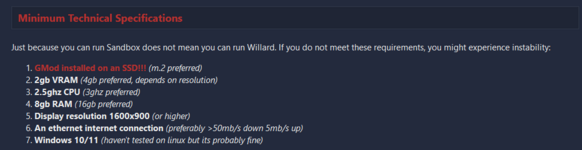
1722243497076.png
This is already stipulated in the FAQ and I tend to point folks there on issues like this.

As for removing custom items from the DB, I've said multiple times that should never be done. It is a bad idea and break all sorts of things.

Regardless, as it was discussed in the discord server, there's really nothing we can do here. If we move to a new schema for V3 and go on a serious feature diet then this problem may go away. However, it may not even be the root of the issue. There are a lot of variables that influence this issue and a lot of them are things beyond our control.
 
Status
Not open for further replies.
Back
Top