

- Joined
- Nov 11, 2022
- Messages
- 822
- Thread Author
- #1
The Business Handbook
(This handbook is a mixture of IC and OOC information. OOC information should be disregarded when mentioning the handbook IC.)
(This handbook is a mixture of IC and OOC information. OOC information should be disregarded when mentioning the handbook IC.)
Table of Contents: Use CTRL+F to quickly find the Letter-Number representing the topic you are looking for.
Business Information
C-1 • INTRODUCTION
C-2 • HOW TO START A BUSINESS
C-3 • BUSINESS HIERARCHIES
C-4 • BUSINESS PERMIT LISTS AND GENERAL INFORMATION
C-5 • HOW TO USE THE POS TERMINAL
C-6 • HOW TO USE THE CIVIL TERMINAL
C-1 | INTRODUCTION
This handbook will provide information relevant to starting up and maintaining a Business. Down to the rent prices to each location and the different permits one can obtain.
Stores are managed by their business owners, but the property itself is owned by the Civil Workers Union.
C-2 | HOW TO START A BUSINESS
These days, owning a store is easy as it is automated via the Shop Terminal System. Below is a video on how it functions
Certain Businesses, require a Social Credit Count along with an Initial Purchase cost into the rent. It will all be displayed on the shop terminal before you purchase it
Once you start renting the business, add employees. You are able to add them on the Shop section of the CIVIL TERMINAL there will be a button to add an employee or tenant. All you need is their CID and it will give the permits to them automatically
In the event you do not pay rent for your store, you will be automatically evicted from your shop system
However, there are some locations that are not set up with the shop terminals, such as stalls. When In doubt, speak with a member of the Civil Workers Union regarding locations without shop terminals
C-3 | BUSINESS HIERARCHIES
Manager (Business Owner) - The main tenant of a storefront who is responsible for ensuring the rent is paid and requesting his permits be shared with valid employees., as well as other business requests
Employee - These are people who are authorized to share in the Owner's permit access, gaining all the same permits unless otherwise stated.
BIOTIC EMPLOYMENT INFORMATION
Because of the Biotic Cohesion System, Biotics of Tier 1 Cohesion status can work as an Assistant within any store.
Similarly, Biotics of a Tier 2 Cohesion status and above, who have been granted a CID, are also able to seek the job of Employee, Biotics with reading abilities are expected to fully understand and act by the handbook..
C-4 | RULES OF OPERATING A BUSINESS
If one wishes to operate a business, then they are held to certain standards. Restrictions come with representing the union, and few are held so high as our Store owners. They must agree to these terms and may not violate them, lest they risk at minimum a fine and at worst the Director removing their tenancy. The operational Guidelines are as follows:
• Store Owners must accept personal responsibility for their actions, as well as moral responsibility for the actions of their employees.
• From the point of being employed within a business, all transactions (whether store-related or not) must be made through their provided POS terminal with a valid reason listed.
• They may only sell items valid within the spirit of their permit; Generally only allowed to sell legal creations made from their permit.
• They must consent to periodic building inspections by the MOC and/or the CWU, as well as health inspections by the CMRU.
• Biotics may not manage a Business under Tier 3, as specified under the Biotic Mandate. However, they may work within one.
• Using permits to self-supply
• Store owners must not own a vending machine when applying for a business, and vice versa
If a business or business owner is found to be breaking one of the various rules, it may incur an infraction or punishment. The punishment can vary on the scale of which rule was broken and to what extent. Punishments are left to the discretion of the Workers Union
C-4 | BUSINESS PERMIT LISTS AND GENERAL INFORMATION
Permits can be purchased when looking through the appropriate shop terminal. You can select up to a maximum of three without introducing any rent increase. When purchasing products from the permit tab, the relevant item will be sent through to the pickup terminal. If an item is spoiled or incorrect, place it back into a pickup terminal to prevent loss of city stock. Any misuse of this can result in punishments.
The maximum amount of permits one business can own without incurring a rent increase is three.
Higher-tiered (4+) Collaborator Store Owners may be provided with the luxury permit without incurring a rent increase.
Slum stores are forbidden from owning the luxury permit.
Triumph Street is forbidden from owning the luxury permit. Unless without special authorization from the Directorate
Alcohol Permit
Enables access to both Synthetic and Authentic Alcohol stock. Perfect for bars and restaurants.
Enables access to both Synthetic and Authentic Alcohol stock. Perfect for bars and restaurants.
Arts & Crafts
Grants access to basic office supplies. Also allows the sale of sanctioned literature (approved by the Ministry of Enlightenment)
Grants access to basic office supplies. Also allows the sale of sanctioned literature (approved by the Ministry of Enlightenment)
Restaurant Permit
Grants access to a selection of pre-made food, such as apples and sandwiches. As well as select foodstuffs that generally require manually preparing them with kitchen tools. Ideal for restaurants and takeaways.
Grants access to a selection of pre-made food, such as apples and sandwiches. As well as select foodstuffs that generally require manually preparing them with kitchen tools. Ideal for restaurants and takeaways.
Audiobook Permit
Grants access to an extensive list of audiobooks to enable the learning of other languages.
Grants access to an extensive list of audiobooks to enable the learning of other languages.
Clothing Permit
Enables access to select clothing stock. This can range from boots to jackets and hats.
Enables access to select clothing stock. This can range from boots to jackets and hats.
Components Permit
Grants access to a small selection of usable material components. Intended for sales, not store usage.
Grants access to a small selection of usable material components. Intended for sales, not store usage.
Electronics Permit
Grants access to a small selection of electrical devices. From Flashlights to computer terminals.
Grants access to a small selection of electrical devices. From Flashlights to computer terminals.
Luxury Permit
Grants access to a selection of luxury goods that members of the Collaborators Party are solely authorized to purchase. Even if an item here exists in other permits that does not grant the right to sell it to standard Citizens. If something is obtained from this permit stock, then it may only be sold to Tier 4+ collaborators. This stock exists solely for Collaborator use.
Grants access to a selection of luxury goods that members of the Collaborators Party are solely authorized to purchase. Even if an item here exists in other permits that does not grant the right to sell it to standard Citizens. If something is obtained from this permit stock, then it may only be sold to Tier 4+ collaborators. This stock exists solely for Collaborator use.
Non-Alcoholic Permit
Grants access to a selection of beverages. From standard Breen's Water to Coffee and Lemonade.
Grants access to a selection of beverages. From standard Breen's Water to Coffee and Lemonade.
Tools & Storage Permit
Grants access to various kitchen utensils along with some containers and storage devices.
Grants access to various kitchen utensils along with some containers and storage devices.
Special Permits
Tailoring Permit
(Needed: Clothing Permit)
(You must write a Character Authorization to gain approval to be a tailor, once you gain approval, you can follow the instructions below.)
Approval from the CWU Directorate is required. Certain stores are able to opt in for a tailoring permit, officially allowing them to create Tier 4 and CCA clothing. The permit is available after a one-time purchase of 500 credits from the CWU Directorate. The only requirements are that the store must be active, and it has a clothing permit. Stores in the slums are unable to request that permit for obvious reasons
This permit may not be granted to slum or deep slum businesses.
(Needed: Clothing Permit)
(You must write a Character Authorization to gain approval to be a tailor, once you gain approval, you can follow the instructions below.)
Approval from the CWU Directorate is required. Certain stores are able to opt in for a tailoring permit, officially allowing them to create Tier 4 and CCA clothing. The permit is available after a one-time purchase of 500 credits from the CWU Directorate. The only requirements are that the store must be active, and it has a clothing permit. Stores in the slums are unable to request that permit for obvious reasons
This permit may not be granted to slum or deep slum businesses.
Narcotics/Drugs Permit
Grants authorization to sell legalized drugs to any legal buyer.
Contact a member of the Ministry of Progress to see if your store is eligible for this permit.
NOTE: Supply must be purchased from the CWU. All other regulations, such as bulk sales not being authorized, are to be followed, per Executive Order Number 3
Grants authorization to sell legalized drugs to any legal buyer.
Contact a member of the Ministry of Progress to see if your store is eligible for this permit.
NOTE: Supply must be purchased from the CWU. All other regulations, such as bulk sales not being authorized, are to be followed, per Executive Order Number 3
Gambling Permit
Allows the specific establishment to gain the benefits, and restrictions, granted by the Sanctioned Gambling Act.
Allows the specific establishment to gain the benefits, and restrictions, granted by the Sanctioned Gambling Act.
C-5 | How to use the POS
This will be an item you will surely use at some point. When first getting it right, click on it in inventory, then 'bind to ID card'. This makes all money taken on this device go to YOUR profile or whoever OWNS it.

Now let's request some credits. right click on it then click Request Credits. When requesting credits, have a direct line of sight with the individual you are requesting from. Crosshairs have to be on them exactly. (ROLEPLAY TIP: /me takes out their POS device from under the counter and taps on the numbers, turning it around towards the individual and sliding it over. ("Swipe your CID here, please." )

Enter the number of credits you want to request. For example, I am selling a piece of paper to a man named Joe. At my store, we sell paper for 5 credits.

Press 'OK'. Now it's time to describe what I'm selling for record keeping. I could really put whatever I want here but I like to keep things organized, so I put in 'x1 Paper' you can also do 'sheet of paper' or 'paper sheet' or whatever, as long as you and whoever else looks at this log know what it is.

This will be an item you will surely use at some point. When first getting it right, click on it in inventory, then 'bind to ID card'. This makes all money taken on this device go to YOUR profile or whoever OWNS it.
Now let's request some credits. right click on it then click Request Credits. When requesting credits, have a direct line of sight with the individual you are requesting from. Crosshairs have to be on them exactly. (ROLEPLAY TIP: /me takes out their POS device from under the counter and taps on the numbers, turning it around towards the individual and sliding it over. ("Swipe your CID here, please." )
Enter the number of credits you want to request. For example, I am selling a piece of paper to a man named Joe. At my store, we sell paper for 5 credits.
Press 'OK'. Now it's time to describe what I'm selling for record keeping. I could really put whatever I want here but I like to keep things organized, so I put in 'x1 Paper' you can also do 'sheet of paper' or 'paper sheet' or whatever, as long as you and whoever else looks at this log know what it is.
C-6 | How to use the Civil Terminal
Once you buy your shop through the shop terminal or otherwise, a new page is open for you within the Civil Terminal. A button called "Shop" this is where you will manage your shop on the civil terminal.
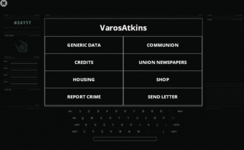
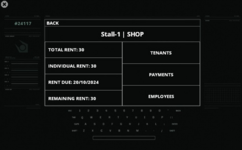
On the page, it will show your shop Identifier. It will show your rent, individual rent if you paid off a portion of the rent. When it is due, the remaining rent, along with tenants, payments, and employees.
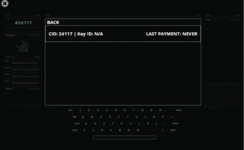
On the Tenants page, it will show who owns the business. If there are multiple people who own the business, you can ask the CWU to add them manually. This gives them permission to view this page on the terminal.
It will show the tenant's CID, Key ID and when they last paid
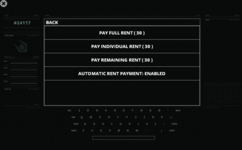
On the Payments Page, it will give you the option to pay Individual Rent (note that the more people you have working, the more split the payments become) and then active or deactivate automatic rent payment. If this is enabled, then your rent is automatically paid if you have the funds
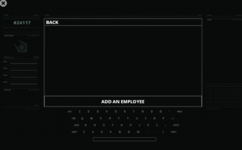
Finally, on the Employees Page. This will allow you to add employees to your system, when you add them, it will leave a key in their dispenser, which will allow them to lock and unlock your shop
Once you buy your shop through the shop terminal or otherwise, a new page is open for you within the Civil Terminal. A button called "Shop" this is where you will manage your shop on the civil terminal.
On the page, it will show your shop Identifier. It will show your rent, individual rent if you paid off a portion of the rent. When it is due, the remaining rent, along with tenants, payments, and employees.
On the Tenants page, it will show who owns the business. If there are multiple people who own the business, you can ask the CWU to add them manually. This gives them permission to view this page on the terminal.
It will show the tenant's CID, Key ID and when they last paid
On the Payments Page, it will give you the option to pay Individual Rent (note that the more people you have working, the more split the payments become) and then active or deactivate automatic rent payment. If this is enabled, then your rent is automatically paid if you have the funds
Finally, on the Employees Page. This will allow you to add employees to your system, when you add them, it will leave a key in their dispenser, which will allow them to lock and unlock your shop
Last edited: