- Joined
- Feb 9, 2022
- Messages
- 681
- Thread Author
- #1
You join the Civil Worker's Union, after having gone through a very rigorous interview. You are left to your own devices a few hours afterwards. You grab your standard issue Worker's Union radio and press the transmit button.
"Hi. I'm new here. What should I do?"
Silence.
"Just learn from the rest," someone responds after a while.
You sigh, and decide to explore the warehouse. After an hour or so, you come across a dusty handbook. The handbook reads:
'Civil Workers Union, Tip & Tricks for new joiners. Written by: Ashley Valera'.
Strange. This book seems at least a year old. And you haven't exactly heard of an Ashley Valera either.
Still, with nothing else to do, you decide to flick through the pages.

OOC Guide!
This is a guide which is designed to help people from the CWU (& indeed the wider RP audience) use tools that they have in their arsenal to make more dynamic & fun workshifts, without relying on Fabricators (too mechanical) or pure theater of the mind (not visual enough) workshifts.
I will name a tool, and then give a few examples of how it can be used to enhance the RP in your workshifts. Hopefully you would be able to come up with more examples even as you're reading along!
I have to give full credit to a lot of my CWU friends who helped me discover this throughout my journey, and specifically for Vanessa Lee (@Triviality ) because their workshifts were always 10/10.
A powerful tool that not enough Workers (or even players & GMs!) use enough. As a CWU worker, you are unofficially a 'mini-GM', and you can ask players to make rolls for specific outcomes. You cannot powerplay your way on another character (E.G.: You rolled too low, you lose an arm/die) but you can definitely give people some injuries or consequence for failing rolls.
Note that stat checks are 1-20, while skill checks are 1-100. When I say 'DC', I mean Difficulty check. Strength DC 15 means you have to roll 15+ for that check to succeed (including modifiers). Same goes for 'Gun DC 50' check, for example.
Examples:
Note that stat checks are 1-20, while skill checks are 1-100. When I say 'DC', I mean Difficulty check. Strength DC 15 means you have to roll 15+ for that check to succeed (including modifiers). Same goes for 'Gun DC 50' check, for example.
Examples:
- A box needs a DC13 strength check to lift, or two people lifting it together.
- Soldering metal needs a crafting DC50, and if you roll below 30 you injure you hand and must seek treatment from the on-call doctor.
- Strength DC14 to withstand the hot coal furnace, failure means you begin overheating.
Gamemasters have /localevent, but as a CWU worker you can use /it to narrate things happening. An example is going around people's desks, and just narrating things that happen to them. Especially useful if combined with the prior rolling step.
I once ran a very silly shift of people using Combine Intranet (probably was a bit on the goofy side) and would do /it you get a pop-up ad asking for your CID number for 400 credits. People would just groan and close the pop up, but they found it funny & novel.
Examples:
Generally a really fun tool for setting the atmosphere. And again as long as you don't powergame people will appreciate it more. You're a writer, so write!
I once ran a very silly shift of people using Combine Intranet (probably was a bit on the goofy side) and would do /it you get a pop-up ad asking for your CID number for 400 credits. People would just groan and close the pop up, but they found it funny & novel.
Examples:
- Glass-working shift, you narrate how someone cuts their hand.
- Mining shift, narrate how the light flickers, and people think they see a headcrab (or perhaps ask a GM to do this)
- Someone using a piece of gear that you prop-created (e.g. fire extinguisher), make it break and do a /it the water dies down, you must get to the fountain to refuel it (or something)
Generally a really fun tool for setting the atmosphere. And again as long as you don't powergame people will appreciate it more. You're a writer, so write!
I used scenetexts a lot to describe areas or things. It can be a powerful tool if used correctly. Not much to add, except that the command is /scenetext (or /adminscenetext if you're staff).
Examples:
Examples:
- Graffiti on the wall (I once had people pressure wash the walls of I24 from graffiti, great fun).
- Show the state of some objects (e.g. this passage is blocked)
- Can be utilized to relay instructions (e.g. 'Instructions on this noticeboard state: To turn on the machine, you have to...)
Very similar to /scenetext. Except that people feel a lot more clever because it is not inherently visible. Hovering over something & gleaming an insight no one else did is a rush that can be compared to abusing Schedule 1 drugs (or so I've heard).
You simply hover over a prop, for example a trash bag, and then you run the propdescriptionadd command, giving it a title & a description of sorts.
Examples:
You simply hover over a prop, for example a trash bag, and then you run the propdescriptionadd command, giving it a title & a description of sorts.
Examples:
- 'Suspicious Suitcase' 'This suitcase seems to make a strange ticking noise that seems to be increasing in frequency'
- 'Silicon Gun' 'A silicon gun, you point towards the area you want to apply silicon to, and then squeeze.'
- 'Water reservoir' 'You can use a bucket to collect water from here.'
Materials help a lot with decoration, allowing you to change props into things you didn't think of. A water barrel could be turned into a radioactive barrel if you apply the right material to it. There are also props (such as the scene building ones) that need material or else it won't really work.
The one cool example I can think off the top of my head is the blueprint material. Use it, alongside propdescriptionadd, to show what 'could' be done in a particular area. If there is a manual fabrication shift, for example request device creation, then spawn a request device prop & use the blueprint material. Alongside a prop desc, people will intuitively understand what they should make without you lifting a finger. I think Brickwall was the first person to think of this.
An honorable mention, while not material, is the invisible color. You can make something transparent if you want to, for whatever reason, not have it show up.
The one cool example I can think off the top of my head is the blueprint material. Use it, alongside propdescriptionadd, to show what 'could' be done in a particular area. If there is a manual fabrication shift, for example request device creation, then spawn a request device prop & use the blueprint material. Alongside a prop desc, people will intuitively understand what they should make without you lifting a finger. I think Brickwall was the first person to think of this.
An honorable mention, while not material, is the invisible color. You can make something transparent if you want to, for whatever reason, not have it show up.
The emitter is a cool tool that allows you to spew effects. You can combine this with the invisibility tool to hide the actual emitter from site I think.
Examples:
Sidenote: I once saw Triviality use the motor tool to simulate a large drill. Zero clue how they did that, but if you can replicate it *please* do so.
Examples:
- Using the sparks tool to simulate a soldering iron.
- Using the sparks tool to simulate a jackhammer drilling into the ground.
- Using the water tool to simulate a chemical reaction bubbling over.
Sidenote: I once saw Triviality use the motor tool to simulate a large drill. Zero clue how they did that, but if you can replicate it *please* do so.
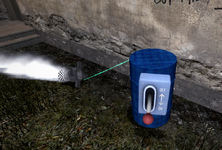
You don't actually have to make the thruster move or provide any power. It has a few effects & sounds that add to the experience, though. Using a combination, you can create a unique set of tools. I have two examples off the top of my head.
Examples:
Examples:
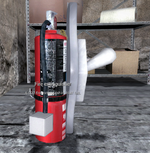
- Fire extinguisher. Use the thruster steam effect & sound (can't recall their exact names) and place it on top of an actual fire extinguisher. Voila, it works now!
- Flamethrower: Use the thruster fire effect & sound to do the exact opposite of the above. CivPro might hate you for this, so probably let them know in advance. I am not responsible for any beatings your character endures.
Lights are quite versatile. You can use the colors to simulate different outcomes, for example two lights (red/green) to simulate a process succeeding or failing. Or a single amber light to signal people to pause or continue whenever it is on or off. Or even for general ambience. Could also be attached to a prop to function as a strong flashlight.
Examples:
Examples:
- If the map has a mine, put a few lights down, and then make up some BS reason for why the workers have to give up their flashlights before entering. Then, turn the lights on & off randomly (VERY scary).
- In a manual fabrication workshift, you can have the end step be 'Place the device/object in this testing chamber'. Close the chamber, then turn on the green light if it passes the test, and red light if it fails.
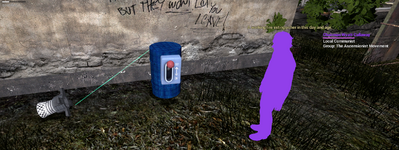
Rope tool is very good for conveying a 'connection' from point A to point B. Think of it less as an actual rope, and more as a flow of current.
Examples:
Examples:
- An electric wire rope that shows an electric circuit, or connected to a device of sorts.
- A thick blue rope showing the flow of water, for example in a pressure washer.
- A small rope, connecting a soldering device to its own power source.
- A red rope, signifying an 'off-limits' area or one of those ribbons the mayor cuts when unveiling a new building.
You've placed all the above. Great! Now, you can allow players to operate all of it themselves without you doing anything by simply placing buttons that connect to specific objects.
Examples:
Examples:
- A button that that starts the pressure washer, starting the flow of water/steam.
- A button that runs an emitter or thruster, starting a thermal reaction.
- A button that does nothing, but in the background you do a /it.
Hello fellow adminge. Lovely seeing you here.
One of the best tools you have that players do not is the duplicator & advanced duplicator tools. Use them to save your creations for the future, as well as robbing things from other people (I like to steal @Badger work & pass it off as my own) both from within the server as well as the workshop. Work smart not hard, and remember:
Good Artists borrow, great artists steal.
One of the best tools you have that players do not is the duplicator & advanced duplicator tools. Use them to save your creations for the future, as well as robbing things from other people (I like to steal @Badger work & pass it off as my own) both from within the server as well as the workshop. Work smart not hard, and remember:
Good Artists borrow, great artists steal.
Last edited: