I've had this issue in the past. I fixed it with some tweaking of my game files. This
could help but it's more my own personal fix that worked for
me so no guarentees here.
You're gonna want to add some launch options to Garry's Mod. Just incase you don't know how: Go to Library > Garry's Mod > (right click) > Properties > General (From general at the bottom of the tab you will see 'Launch Options' and a bar to input text. You just need to add the inputs there and it will save them)
1)
-high (Sometimes these issues can be caused by your computer simply trying to run mulitpile programs at once and thus not keeping up with the large server load. This input sets it so when Garry's Mod is running your computer reckonises it as its top priority program)
2)
-dxlevel (this input is followed by a number. I reccomend either
-dxlevel 95 or
-dxlevel 98. This should improve the performance and help your computer keep up with sending info back and forth to the server client. As sometimes that is why it does not load. Atleast for me)
3)
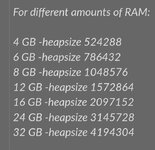
-heapsize (This one is quite important. Workshop packs sometimes don't load properly if there isn't enough dedicated space to Garry's Mod and thus you won't load. This input allows you to manually dedicate more space than the default. Heapsize should be followed by a number and is measured in Kb. I pulled this screenshot off the internet that should help with setting this one up. It's quite complicated:
View attachment 9013
4)
-nocrashdialog (this one solves errors where certain memory cannot be read by simply ignoring them)
Anyway. Hope these help. They worked for me and fixed this issue. I personally use all of them but you can pick and choose based on what you think the issue is.