Welcome!

By registering with us, you'll be able to discuss, share and private message with other members of our community.

SignUp Now!

Bug This is driving me nuts

  • Thread starter Thread starter Donavin Jones
  • Start date Start date
D

Donavin Jones

Guest
  1. Bug: I cant seem to load in the game no matter what i do.
  2. Description: Okay, so, whenever I try loading into Willard no matter what, when i pick my character it just sticks to the background. I have uninstalled the content pack and reinstalled it. I have restarted my pc gmod and even steam. Hell I even waited 40 minutes in it for nothing, I do not know what to do, this is driving me nuts.
    I NEED HELP
  3. Errors/time: Nothing new when I open console, it just shows the common errors that fixes on its own and nothing else. I'd get the can and material error even before this happened, and it was fine.
 
Just to be sure, are you using the x64 version of Garry's mod?
 
  1. Bug: I cant seem to load in the game no matter what i do.
  2. Description: Okay, so, whenever I try loading into Willard no matter what, when i pick my character it just sticks to the background. I have uninstalled the content pack and reinstalled it. I have restarted my pc gmod and even steam. Hell I even waited 40 minutes in it for nothing, I do not know what to do, this is driving me nuts.
    I NEED HELP
  3. Errors/time: Nothing new when I open console, it just shows the common errors that fixes on its own and nothing else. I'd get the can and material error even before this happened, and it was fine.

I've had this issue in the past. I fixed it with some tweaking of my game files. This could help but it's more my own personal fix that worked for me so no guarentees here.

You're gonna want to add some launch options to Garry's Mod. Just incase you don't know how: Go to Library > Garry's Mod > (right click) > Properties > General (From general at the bottom of the tab you will see 'Launch Options' and a bar to input text. You just need to add the inputs there and it will save them)

1) -high (Sometimes these issues can be caused by your computer simply trying to run mulitpile programs at once and thus not keeping up with the large server load. This input sets it so when Garry's Mod is running your computer reckonises it as its top priority program)

2) -dxlevel (this input is followed by a number. I reccomend either -dxlevel 95 or -dxlevel 98. This should improve the performance and help your computer keep up with sending info back and forth to the server client. As sometimes that is why it does not load. Atleast for me)

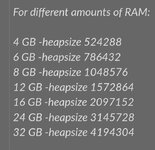
3) -heapsize (This one is quite important. Workshop packs sometimes don't load properly if there isn't enough dedicated space to Garry's Mod and thus you won't load. This input allows you to manually dedicate more space than the default. Heapsize should be followed by a number and is measured in Kb. I pulled this screenshot off the internet that should help with setting this one up. It's quite complicated:
Screenshot_20220226-115328_Chrome.jpg

4) -nocrashdialog (this one solves errors where certain memory cannot be read by simply ignoring them)

Anyway. Hope these help. They worked for me and fixed this issue. I personally use all of them but you can pick and choose based on what you think the issue is.

 
Last edited:
Glad I could help lmfao
I've had this issue in the past. I fixed it with some tweaking of my game files. This could help but it's more my own personal fix that worked for me so no guarentees here.

You're gonna want to add some launch options to Garry's Mod. Just incase you don't know how: Go to Library > Garry's Mod > (right click) > Properties > General (From general at the bottom of the tab you will see 'Launch Options' and a bar to input text. You just need to add the inputs there and it will save them)

1) -high (Sometimes these issues can be caused by your computer simply trying to run mulitpile programs at once and thus not keeping up with the large server load. This input sets it so when Garry's Mod is running your computer reckonises it as its top priority program)

2) -dxlevel (this input is followed by a number. I reccomend either -dxlevel 95 or -dxlevel 98. This should improve the performance and help your computer keep up with sending info back and forth to the server client. As sometimes that is why it does not load. Atleast for me)

3) -heapsize (This one is quite important. Workshop packs sometimes don't load properly if there isn't enough dedicated space to Garry's Mod and thus you won't load. This input allows you to manually dedicate more space than the default. Heapsize should be followed by a number and is measured in Kb. I pulled this screenshot off the internet that should help with setting this one up. It's quite complicated:
View attachment 9013

4) -nocrashdialog (this one solves errors where certain memory cannot be read by simply ignoring them)

Anyway. Hope these help. They worked for me and fixed this issue. I personally use all of them but you can pick and choose based on what you think the issue is.
I am very sad to inform
none of these worked.
I'll tell you the new things that happened.
1 : I timed out more loading with X64 bit
2 : I don't even think the launch options did anything @Liam
The only thing that was the same was staying on the background while loading my character.
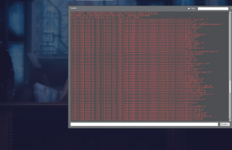
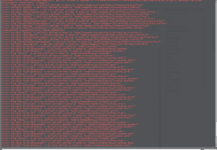
And also this shit, fuuck ton of errors, more then normal1645923552285.png
 
Try verifying integrity of game files, that's always the very first thing I do after a restart.
 
Try verifying integrity of game files, that's always the very first thing I do after a restart.
tried that and

1645946195901.png
the struggle is real.
should I uninstall ALL of my mods and just use willard ones? I don't play any other server anymore and i got a bunch of useless mods of when i played single player.
 
tried that and

View attachment 9021
the struggle is real.
should I uninstall ALL of my mods and just use willard ones? I don't play any other server anymore and i got a bunch of useless mods of when i played single player.

Yes, now the workshop has a very useful button, unsuscribe from all (it didn't before and it was a pain unsubscribing from all)

I would unsuscribe from all, uninstall gmod, reinstall gmod, and suscribe only to Willard. This helped with my load times
 
Try verifying integrity of game files, that's always the very first thing I do after a restart.
@Donavin Jones

What night man said is a very good tip. Also you could try adding a "-clientport" followed by whatever your client port is to launch options. That can stop time out issues specifically. Atleast with me. I noticed Willard was having trouble sending info back and forth to my client and so I was being timed out. Until I did this.

Type “Cmd” in the search box. Open Command Prompt. Enter the netstat -a command to see your port numbers.
 
Back
Top